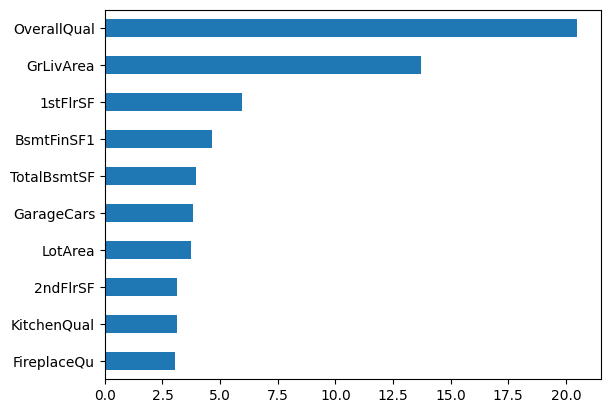
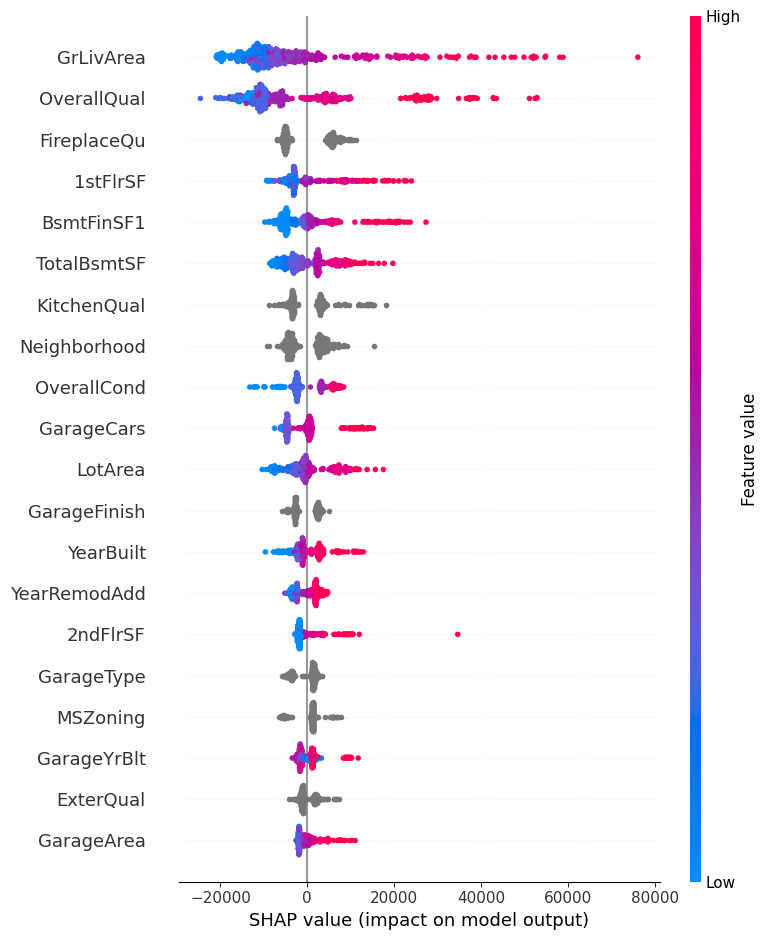
AutoRegressor is a class for performing automated regression tasks, including preprocessing and model fitting. It supports several regression algorithms and allows for easy comparison of their performance on a given dataset. The class provides various methods for model evaluation, feature importance, and visualization.
Example Usage: ar = AutoRegressor(num_cols, cat_cols, target_col, data) ar.fit_report()
Unknown section Attributes
Unknown section See Also
Unknown section Notes
Unknown section Examples
The target is predicted by local interpolation of the targets associated of the nearest neighbors in the training set.
Read more in the :ref:User Guide <regression>.
.. versionadded:: 0.9
Type
Default
Details
n_neighbors
int
5
Number of neighbors to use by default for :meth:kneighbors queries.
weights
str
uniform
Weight function used in prediction. Possible values:
- ‘uniform’ : uniform weights. All points in each neighborhood are weighted equally. - ‘distance’ : weight points by the inverse of their distance. in this case, closer neighbors of a query point will have a greater influence than neighbors which are further away. - [callable] : a user-defined function which accepts an array of distances, and returns an array of the same shape containing the weights.
Uniform weights are used by default.
algorithm
str
auto
Algorithm used to compute the nearest neighbors:
- ‘ball_tree’ will use :class:BallTree - ‘kd_tree’ will use :class:KDTree - ‘brute’ will use a brute-force search. - ‘auto’ will attempt to decide the most appropriate algorithm based on the values passed to :meth:fit method.
Note: fitting on sparse input will override the setting of this parameter, using brute force.
leaf_size
int
30
Leaf size passed to BallTree or KDTree. This can affect the speed of the construction and query, as well as the memory required to store the tree. The optimal value depends on the nature of the problem.
p
int
2
Power parameter for the Minkowski metric. When p = 1, this is equivalent to using manhattan_distance (l1), and euclidean_distance (l2) for p = 2. For arbitrary p, minkowski_distance (l_p) is used.
metric
str
minkowski
Metric to use for distance computation. Default is “minkowski”, which results in the standard Euclidean distance when p = 2. See the documentation of scipy.spatial.distance<br><https://docs.scipy.org/doc/scipy/reference/spatial.distance.html>_ and the metrics listed in :class:~sklearn.metrics.pairwise.distance_metrics for valid metric values.
If metric is “precomputed”, X is assumed to be a distance matrix and must be square during fit. X may be a :term:sparse graph, in which case only “nonzero” elements may be considered neighbors.
If metric is a callable function, it takes two arrays representing 1D vectors as inputs and must return one value indicating the distance between those vectors. This works for Scipy’s metrics, but is less efficient than passing the metric name as a string.
metric_params
NoneType
None
Additional keyword arguments for the metric function.
n_jobs
NoneType
None
The number of parallel jobs to run for neighbors search. None means 1 unless in a :obj:joblib.parallel_backend context. -1 means using all processors. See :term:Glossary <n_jobs> for more details. Doesn’t affect :meth:fit method.
from sklearn.datasets import fetch_openmlfrom sklearn.compose import make_column_selectorimport numpy as npimport pandas as pd# Load the Ames Housing datasethousing = fetch_openml(name="house_prices", as_frame=True)X = housing['data'].fillna(np.nan)y = housing['target']data = pd.concat([X, y], axis=1)num_cols = make_column_selector(dtype_include=np.number)(X)cat_cols = make_column_selector(dtype_include=object)(X)# Fill na in X with most frequent for cat_cols and median for num_colsX_cat = X[cat_cols].fillna(X[cat_cols].mode().iloc[0])X_num = X[num_cols].fillna(X[num_cols].median())
The default value of `parser` will change from `'liac-arff'` to `'auto'` in 1.4. You can set `parser='auto'` to silence this warning. Therefore, an `ImportError` will be raised from 1.4 if the dataset is dense and pandas is not installed. Note that the pandas parser may return different data types. See the Notes Section in fetch_openml's API doc for details.
In a Jupyter environment, please rerun this cell to show the HTML representation or trust the notebook. On GitHub, the HTML representation is unable to render, please try loading this page with nbviewer.org.
# Predict the target variable for new datapredictions = cbcv.predict(X_catboost)
# Test CatBoostRegressorCV using AutoRegressor to fill automatically missing values and arrange values automaticallycbcv = CatBoostRegressorCV( cat_features=list(range(len(cat_cols))))ar = AutoRegressor( num_cols=num_cols, cat_cols=cat_cols, target_col='SalePrice', use_catboost_native_cat_features=True, data=data, estimator=cbcv,)ar.fit_report()
from sklearn.ensemble import RandomForestRegressor# Initialize the RegressorTimeSeriesCV with a base regressor and cross-validation strategyreg_tscv = RegressorTimeSeriesCV(base_reg=RandomForestRegressor(), cv=5)# Fit the RegressorTimeSeriesCV to the training datareg_tscv.fit(X_num, y)reg_tscv
In a Jupyter environment, please rerun this cell to show the HTML representation or trust the notebook. On GitHub, the HTML representation is unable to render, please try loading this page with nbviewer.org.
# Initialize the KNNRegressor with specific parametersknn_reg = KNNRegressor(n_neighbors=3)# Fit the KNNRegressor to the training dataknn_reg.fit(X_num.values, y)# Predict the target variable for new data and return the index of the nearest matched neighborpredictions, nearest_matched_index, neigh_ind = knn_reg.predict(X_num, return_match_index=True, pred_calc='median')